











Redeeming Your Holiday Quiz Challenge CodeUpdated 8 months ago
If you are participating in our Holiday Quiz Challenge, please follow these steps to access the quiz and successfully enter your redemption code:
Step 1: Access the Quiz Page
To start the quiz, you must first log in to your online account.
Step 2: Start the Quiz
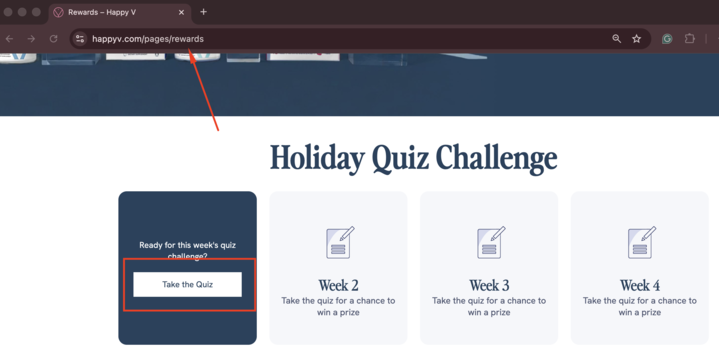
Navigate to the relevant quiz module in the Rewards Page.
Click the "Take the Quiz" option.
Step 3: Keep Both Tabs Open
After clicking, the actual quiz will open in a new browser tab.
There should now be two open tabs (the main Rewards Page and the new Quiz tab).
Please keep both tabs open as you complete the quiz in the new tab.
Step 4: Enter the Code/Answer
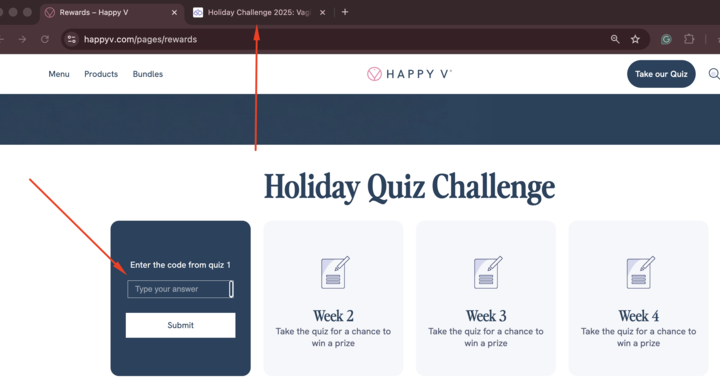
Once you have finished taking the quiz, simply navigate back to the first tab (the main Rewards Page).
The "Take a Quiz" button will be replaced with a field where you can enter the answer or redemption code from the quiz you just completed.
Enter the code/answer to redeem your reward.
This same process applies to all remaining quizzes in the challenge.